Approach to Creating Conversational Clickable Prototypes
Enhancing User Experiences with AI-Powered Interactions

Introduction
What are Conversational Clickable Prototypes?
- Interactive visual prototypes enhanced with conversational AI capabilities
- Combines traditional UI navigation with natural language interaction
- Creates a multi-modal user experience
Business Value
- Faster user testing and feedback collection
- More intuitive user experiences
- Reduced development iterations
"Speed to Value"
© 2025 ValueLabs | Approach to Creating Conversational Clickable Prototypes
ValueLabs Methodology Foundation
Discovery & Analysis
- Understanding user needs and application requirements
- Analyzing existing interfaces and interaction patterns
- Identifying conversation opportunities
Strategic Planning
- Designing the prototype architecture
- Planning the conversational flow
- Setting measurable objectives
Implementation & Delivery
- Building the integrated prototype
- Testing with real users
- Iterative refinement
"Doing the right thing. Always."
© 2025 ValueLabs | Approach to Creating Conversational Clickable Prototypes
Clickable Prototype Development
Methods
- Low-fidelity wireframes vs. high-fidelity mockups
- Code-based vs. no-code approaches
- Progressive enhancement strategy
Tools and Technologies
- Design tools: Figma, Adobe XD, Sketch
- Prototyping platforms: InVision, Axure, ProtoPie
- Code-based: HTML/CSS/JS frameworks
Best Practices
- Consistent navigation patterns
- Clear visual hierarchy
- Accessibility considerations
- Responsive design principles
Testing and Iteration
- User testing methodologies
- Metrics for evaluating effectiveness
- Iteration cycles and feedback incorporation
- A/B testing for alternative approaches
© 2025 ValueLabs | Approach to Creating Conversational Clickable Prototypes
Understanding the Application
Site Mapping Methodology
- Automated vs. manual site mapping techniques
- Using ValueLabs' sitemap approach as a template
- Tools for generating site maps
- Identifying key user flows and journeys
Content Inventory Process
- Cataloging all pages and interactive elements
- Identifying content types and relationships
- Documenting user flows and interaction patterns
Home
├── Products
│   └── AiDE Platform
│       ├── Vertical AI
│       ├── AiDE Fabric
│       ├── Eval Framework
│       ├── Security
│       ├── OneClick Pipeline
│       ├── Guardrails
│       ├── Prompt Enhancer
│       └── Fine-tuning
├── Services
│   ├── Product Development
│   ├── Quality Engineering
│   ├── Data & Analytics
│   ├── Cybersecurity
│   ├── Operations
│   └── Mobile & Enterprise Apps
└── About Us
    ├── Our Work
    │   ├── Discovery & Analysis
    │   ├── Strategic Planning
    │   └── Implementation & Delivery
    └── Careers
© 2025 ValueLabs | Approach to Creating Conversational Clickable Prototypes
Intent Mapping Process
Intent Categories
- Information-seeking intents
- Navigation intents
- Action-oriented intents
- Comparison and decision-making intents
Intent Taxonomy Development
- Primary, secondary, and tertiary intents
- Intent relationships and hierarchies
- Intent prioritization based on user needs
Mapping Intents to UI Elements
- Direct correlations between intents and UI components
- Many-to-many relationships between intents and functions
- Fallback mechanisms for unmapped intents
Example Intent Map
CompanyOverview Intent
Description: General information about company
Example Queries:
- "Tell me about ValueLabs"
- "What does ValueLabs do?"
- "What is ValueLabs' tagline?"
Response Type: Information
Key Information: Tagline, focus, value proposition
© 2025 ValueLabs | Approach to Creating Conversational Clickable Prototypes
Action Identification
Types of Actions
Information Provision
- Static content display
- Dynamic content generation
- Contextual information
Navigation/Redirection
- Page navigation
- Section scrolling
- Modal/popup display
Data Operations
- Form submission
- Data retrieval
- Filtering and sorting
Action Mapping Methodology
- Identifying all possible actions within the application
- Categorizing actions by type and complexity
- Documenting action requirements and dependencies
- Creating a comprehensive action-intent matrix
Handling Multi-Step Actions
- Breaking complex actions into manageable steps
- Maintaining context across conversation turns
- Providing clear guidance and confirmation
- Handling interruptions and resuming workflows
© 2025 ValueLabs | Approach to Creating Conversational Clickable Prototypes
Leveraging AiDE Platform Components
Vertical AI
- Training on industry-specific terminology
- Specialized knowledge bases
- Tailored responses based on industry context
AiDE Fabric
- Selecting appropriate LLM based on requirements
- Configuring model parameters for optimal performance
- Balancing accuracy, speed, and cost
Eval Framework
- Quantitative assessment of conversational performance
- Comparing different models and configurations
- Continuous improvement based on metrics
Security
- PII and PHI filtering
- Data privacy protections
- Compliance with regulations (SOC 2, HIPAA, ISO)
OneClick Pipeline
- Transitions from design to deployment in one click
- Converts requirements into deliverables
- Ensures traceability with updates
Guardrails
- Input and output filtering
- Out-of-context and hallucination prevention
- Admin dashboards and role-based access
Prompt Enhancer & Templates
- Enhancing user input with context
- Improving system understanding
- Customizable persona templates
Fine-tuning
- Expert-level output through fine-tuned models
- Training on high-quality data
- Continuous improvement based on feedback
© 2025 ValueLabs | Approach to Creating Conversational Clickable Prototypes
Backend Service Architecture
LLM Integration
- API-based integration (Anthropic Claude, OpenAI, etc.)
- Local vs. cloud-based models
- Hybrid approaches for different use cases
- Caching strategies for performance
Knowledge Base Construction
- Structured vs. unstructured knowledge
- Knowledge extraction from existing content
- Knowledge maintenance and updates
- Versioning and change management
API Design
- RESTful endpoints for conversation
- Authentication and rate limiting
- Request/response formats
- Error handling and fallbacks
Error Handling
- Graceful degradation strategies
- Fallback responses for service disruptions
- Logging and monitoring for troubleshooting
- User-friendly error messages
© 2025 ValueLabs | Approach to Creating Conversational Clickable Prototypes
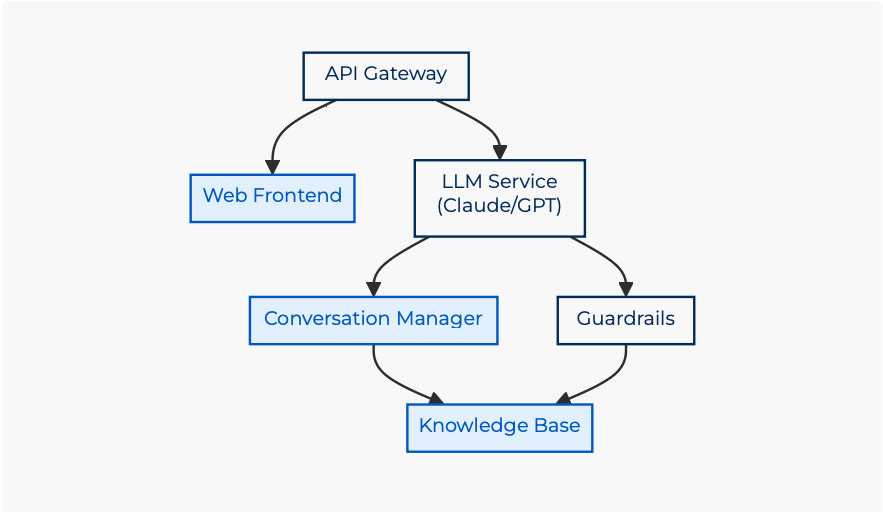
System Architecture
Conversational Clickable Prototype Architecture
© 2025 ValueLabs | Approach to Creating Conversational Clickable Prototypes
Frontend Interface Development
UI/UX Considerations
- Chat bubble design and layout
- Input methods (text, voice, hybrid)
- Visual feedback for system status
- Conversation history management
Integration with Clickable Prototype
- Embedding chat interfaces within the prototype
- Coordinating UI state with conversation state
- Handling transitions between clicking and chatting
- Unified interaction history
Real-time Content Updates
- Dynamic content loading based on conversation
- Updating UI elements based on conversational context
- Synchronizing multiple information sources
- Handling asynchronous operations
Accessibility Considerations
- Screen reader compatibility
- Keyboard navigation
- Alternative interaction methods
- WCAG 2.1 compliance
© 2025 ValueLabs | Approach to Creating Conversational Clickable Prototypes
Implementation Workflow
Implementation Roadmap
A structured approach from prototype creation to final testing and refinement
© 2025 ValueLabs | Approach to Creating Conversational Clickable Prototypes
Case Study: ValueLabs Knowledge Agent
Overview
- AI-powered chatbot for ValueLabs information
- Provides details about services, products, and company
- Handles various user intents and queries
- Integrates with website for seamless experience
Architecture
- Anthropic Claude integration
- Comprehensive knowledge base
- RESTful API for communication
- Responsive web frontend
Key Features
- Intent-based response generation
- Markdown formatting for structured responses
- Context-aware conversations
- Fallback mechanisms for unknown queries
Lessons Learned
- Importance of comprehensive intent mapping
- Value of structured knowledge base
- Need for continuous evaluation and improvement
- Balance between conversational and UI-based interactions
© 2025 ValueLabs | Approach to Creating Conversational Clickable Prototypes
OneClick Pipeline Integration
Automated Deployment
- Leveraging ValueLabs' OneClick Pipeline
- Automating the transition from design to deployment
- Converting requirements into deliverables
- Ensuring traceability throughout the process
CI/CD for Conversational Interfaces
- Automated testing of conversational flows
- Continuous deployment of updated models
- Monitoring and alerting for conversational quality
- Version control for knowledge base and prompts
Integration Benefits
- Reduced time-to-market for conversational features
- Consistent quality across deployments
- Automated documentation generation
- Simplified rollback procedures
Implementation Steps
- Configure pipeline for conversational components
- Set up automated testing for intent recognition
- Establish deployment gates and quality checks
- Implement monitoring for conversation metrics
© 2025 ValueLabs | Approach to Creating Conversational Clickable Prototypes
Conclusion
Key Takeaways
- Integrated approach combining visual and conversational interfaces
- Importance of comprehensive intent and action mapping
- Value of AiDE platform components for rapid development
- Structured methodology from discovery to implementation
Future Directions
- Multimodal interactions (text, voice, visual)
- Personalization based on user behavior
- Advanced analytics for conversation optimization
- Integration with emerging technologies (AR/VR, IoT)
Thank You
For more information, contact us at:
contactus@valuelabs.com
© 2025 ValueLabs | Approach to Creating Conversational Clickable Prototypes